


Knowledge
 Test Bench Software in Connected Data Structures
Knowledge
From experts for experts
Valve Test Benches as Part of Digital Process Chains
Software for valve test benches has been around for roughly 20 years. Yet although these applications have long included databases, they are still, in most cases, isolated solutions. Our experience as a test bench manufacturer also shows that most users rely on test bench software merely as a digital display. With a new system approach and flexible web technologies, valve test benches can now be integrated into digital process chains with minimal effort. From market-leading valve manufacturers to small service providers, this new technology significantly improves the efficiency of testing operations.
Table of contents
- 01. Expectations and Reality
- 02. Time for a New Approach
- 03. Data Import via Web Services
- 04. The Web Service as an Administrator’s Project
- 05. Minimalism as the Second Requirement
- 06. The PDF Test Report as Part of the Downstream Process Chain
- 07. Data Import from Excel – the “Small-Scale” Solution
Expectations and Reality
In most cases, test bench software functions as little more than a digital display. This is certainly useful, as it provides highly accurate, easy-to-read numerical values in addition to digital “gauges.” It is also much easier to switch between sensors than it is with conventional pressure gauges or flow sensors. However, this represents only a small fraction of the functionality originally envisioned by the software development team.
As early as 2004, customers expressed the desire for software without charts — essentially just a “large, attractive gauge” on the screen. At the same time, management teams and production departments were proposing far more ambitious software concepts. In practice, however, only a small portion of these functions is ultimately used.
The reason for this limited use lies in the nature of the testing process itself. Without software, the tester is given a job sheet on which results are entered manually. Modern valve manufacturers may replace the job sheet with an input mask in the company’s software system. In either case, the tester works with a third-party system that adds only minimal extra effort to the actual testing task. Everything beyond that is of little relevance to the operator.
When test bench software is not integrated into a broader system environment, a significant administrative burden is shifted to the test bench. The operator is now expected to enter valve data correctly and ultimately produce a clean, signed test report. The task becomes much more complex, because the operator has effectively become a software user as well. The additional time required creates costs that are not normally budgeted as part of the testing process. On top of that, the operator now bears responsibility for the correctness and completeness of documents. As long as a separate, authoritative third-party system remains in place alongside the test bench software — whether a job sheet or an ERP system — it is only natural that the software will continue to be used merely as a digital display.
Time for a New Approach
Until now, test bench software has mainly been designed around the requirements of measurement technology — the more features, the better. In practice, however, these additional functions play little role in day-to-day testing and are typically used only by development departments and quality assurance teams. To deliver maximum value, software must do more than support the test itself; it must also meet the needs of different stakeholder groups within the company.
For test bench operators — less is more: as simple as a smartphone app
- Minimal data entry
- Minimal number of clicks
- Minimal number of decisions
For cost accounting — minimal costs
- Minimal time delays
- Use of existing data
- Minimal rework
For quality assurance — robust, clearly defined processes with little room for operator interpretation
- Defined rules for how results are determined
- Clearly defined pass/fail criteria
For document management
- Completed reports ready for end-customer documentation
Today, networks and database systems are standard technology. Information on the test object is already available. Even in service environments, Excel spreadsheets containing test object data are often available. Integrating the test bench into the digital process chain through its software, using existing data directly, and feeding results and reports back into the process chain is the next logical step in the evolution of test bench software. To make this work and to meet the needs of all relevant stakeholders, three challenges must be addressed:
I. Connection to existing data sources
II. Return of completed digital reports and relevant data
III. Adaptation and partial automation based on customer requirements
Data Import via Web Services
Almost all test bench software solutions on the market include a database. In connected data environments, it has therefore been technically possible for many years to exchange data between test bench software and company databases. The reason this rarely happens lies in the complexity of inter-database communication. The technologies required for this belong to the highest level of programming and system administration. For the test bench environment, this barrier is usually too high.
This hurdle can be avoided by implementing the widely used internet technologies of web services and XML as an additional data access method. METRUS CRS can access both its own internal database directly and external company databases via web services. The process works as follows:
- The tester enters, for example, the order number or valve ID at the test bench and clicks the “XML Import” button.
- The METRUS CRS software sends this search data to the web service.
- The web service retrieves all relevant details from the company database.
- It then returns this information to METRUS CRS in the form of an XML file.
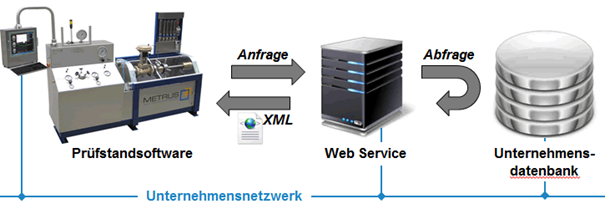
Figure 1: Accessing company data via web services
The imported data typically includes valve characteristics, limit values, and additional order data required for the test report. The principle is similar to the issue desk in a library. The reader (METRUS CRS) decides which book is needed and communicates this to the librarian at the desk (the web service). The librarian knows the endless shelves of the library, finds the book, and hands it over to the reader.
Just as the reader at the issue desk does not know the internal shelving system of the library, METRUS CRS does not need to know the structure of the company database from which the data is retrieved. Regardless of which system the data comes from, the process within METRUS CRS remains the same. In other words, no custom programming is required to connect the test bench software. It is sufficient to enter the web service connection details in the designated location. As lean internet technologies, web services and XML are ideally suited for use in large corporate networks with multiple locations.
The Web Service as an Administrator’s Project
The web service itself consists of two parts: a web server and a PHP script running on it. A web server is a standard software component that can run on one of the company’s existing servers. The widely used Windows Server operating system already includes IIS (Internet Information Services) as a built-in web server. In other words, the web server is typically already available or can be used free of charge on other server platforms as well.
The PHP script is a text file containing a sequence of commands and instructions. These commands are executed by the web server. Just as an MS Word document requires Microsoft Word to be edited, a PHP script requires a web server to run. “PHP” is simply the name of the scripting language, comparable to Java or Visual Basic.
The only customer-specific task is the creation of the PHP script that accesses the company database and generates an XML document from the retrieved data. Since the XML format required by METRUS CRS is clearly defined, the task is reduced to identifying the relevant information in the company database and arranging it accordingly.
PHP scripting is part of the skill set of many system administrators and is basic knowledge for any web developer. The necessary expertise is therefore often already available within the company or can be sourced externally at manageable cost. As a result, the project of connecting the test bench to the company database becomes a manageable in-house IT administration project.
Minimalism as the Second Requirement
Once the test bench software has been successfully connected to the company database, the operator no longer needs to enter data manually. This primarily saves time and effort and therefore reduces costs. However, this alone does not fully reduce the complexity of the task. Equally important for software acceptance is ease of use. The goal is to minimize the number of required clicks and, above all, the number of decisions the operator must make. The software should include only those functions and decisions that are actually necessary for the specific application — less is more.
Traditional test bench software typically offers the maximum possible range of functions, from which users select those they consider useful. Special requirements then lead to customer-specific software projects, which often exceed the budget of the test bench itself. In METRUS CRS, the need for highly specific functions on the one hand and a streamlined, essential user interface on the other is resolved through a special system architecture. The user interface and all calculations are implemented through scripts and are therefore not fixed in an unchangeable executable file. A script is simply a file that can be opened and edited with any standard text editor. This means that adapting calculations or functions does not require a separate custom software development project, but only a slightly modified script.
Figure 2 shows the standard scope of METRUS CRS as a conventional standalone solution. The tester manually enters all data and test parameters, starts the recording, evaluates the chart manually after the test, saves the record, and finally generates a PDF file, which is then saved under a specified file name in an agreed storage location. This process requires moving through several input and selection screens.
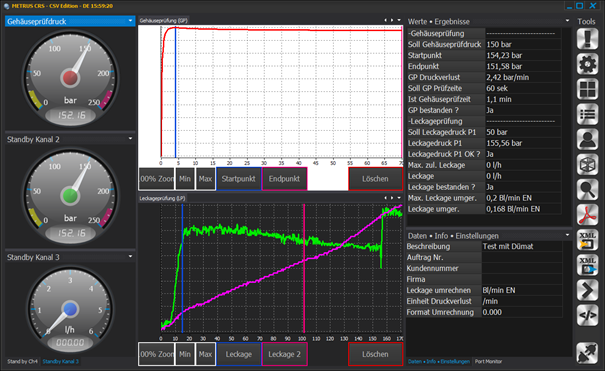
Figure 2: METRUS CRS – CSV as the standard package (full feature scope)
Figure 3 illustrates the optimized approach based on data integration and scripting. The tester enters the valve serial number and clicks the XML button. The recording is started, the test procedure is carried out at the test bench, and finally the tester clicks the PDF button — done. Throughout the entire process, only a single software screen is used, with one data entry and four buttons.
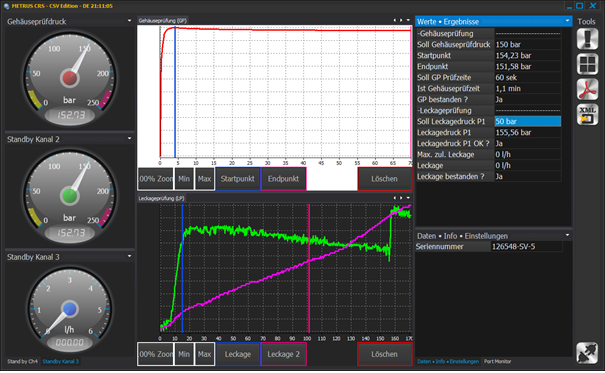
Figure 3: METRUS CRS – with data connection and reduction to essential functions
In the first step, all relevant details and limit values are loaded from the company database via web services, and the test parameters are calculated automatically. A script before recording starts determines the recording duration. A script after recording ends sets the selection points automatically. In the case of a body test, for example, this may set the start point at the maximum value and the end point at the final value in the recording.
Clicking the PDF button also triggers a script that executes the following background steps:
- Check whether all tests have been passed; if not, abort with a message
- Generate the PDF test report
- Create the file name from the content of selected data fields
- Save the PDF file to a predefined network path
- Save the test data record as a log in the local METRUS CRS database
- Display the message: “Report saved”
The scripts used here are standard components of the software. They are not specially developed for this solution, but simply adapted as needed.
The PDF Test Report as Part of the Downstream Process Chain
The final digital result of valve testing is a report in PDF format. If designed appropriately, this report can be included directly in the documentation delivered with the valve. However, the digital process chain does not always end there. Depending on the complexity of the requirements, two further steps may be necessary: digital signature and return of relevant test data.
Many companies still print test reports on paper, sign them, and then scan them back in. Because the test report has formal document status, it becomes valid only once it has been signed by the tester and, where required, countersigned by an inspector. To prevent the digital process chain from breaking at this point, METRUS CRS includes a digital signature function (see Figure 4).
When this function is used, a window opens immediately before the PDF file is generated. The tester signs using the signature pad and confirms the input. A second signature field is available for inspectors or customer acceptance procedures. The result is a digitally signed test report.
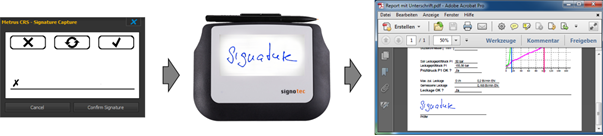
Figure 4: Digital signature using a signature pad
In comprehensive company database systems with integrated document management, the digital process chain is only complete once the successful completion of the test has been reported back to the system. As with data import, a web service is also used here for data return, designed by the user according to specific requirements. METRUS CRS sends an XML document to the web service, which then writes the relevant information into the company database. Particularly relevant here are the path to the PDF test report, the valve ID, the order number, and the test date. Together, these data enable direct access to the test report from within the company software system.
Data Import from Excel – the “Small-Scale” Solution
A web service is highly efficient when valve and order data already exist in a company database system. In service environments, however, this is often not the case. Even so, the benefits of scripting technology and automation — from the start of the test to the finished report on the server — are just as valuable here as they are for large companies.
In such cases, the data import software FlowHeater represents the first step in the digital process chain as a manual process. The work preparation team formats the available valve data — and, where necessary, the customer list — into a suitable Excel structure and then uploads it via the network into the METRUS CRS database. Data entry at the test bench is then reduced to selecting the valve and the customer from a list. From that point on, the process is the same as in the previously described direct database connection via web services.
The networking of digital systems safeguards the medium- and long-term competitiveness of every company. As the final step in valve manufacturing and maintenance, the test bench is ideally positioned to become an integrated part of the digital process chain.
About the author
0 +
Articles in this section

 Valve World Expo
 DIAM&DDM Bochum 2027